
Baltimore Sun
Tribune Publishing Inc.News & Magazines
2.7157.00 Reviews
- Version
- 10.0.60
- Installs
- 50.00K
- Age Rating
- Everyone
Screenshots

Our Review of Baltimore Sun
 Analysis by Appyee
The first thing I’d think about before installing a newspaper app is what I want it to do for me: deliver local reporting, help me follow a developing story, or replace a broad mix of news sources. The Baltimore Sun is most appealing when Baltimore-area coverage is the point, rather than just one more feed of national headlines. I’d treat it as a focused news reader and judge it by how well it fits into a regular reading routine.
Where readers can get stuck
The common friction with a publication app is not always navigation; it can be the moment a reader taps a story and discovers that access depends on a subscription. The app is free to install, but some content requires payment, with in-app purchases listed from $1.00 to $199.99 per item. That broad range makes it especially sensible to check the purchase details shown in the app before confirming anything, rather than assuming that every article is included or that one purchase covers all reading.
This matters most if you only open the app occasionally. A regular reader who follows local government, schools, neighborhoods, or sports may get more practical value from a publication-specific source than someone who wants a free skim of headlines once a week. I’d first browse the accessible material and see whether the reporting and subject mix match my interests; only then would I decide whether paid access fits how often I expect to read.
Setup checks that save time
The app is published by Tribune Publishing Inc. and is listed in News & Magazines. It is free to download, rated for Everyone, and its current version is 10.0.52. The stated minimum operating-system requirement is 8.0, so I’d check the device’s software version before troubleshooting a failed installation. If the app is already installed, I’d also confirm that it is up to date before deciding that a loading or display problem is persistent.
Notifications are worth approaching gradually. Instead of enabling every alert and muting the app later, I’d start with only the kinds of updates I genuinely want to interrupt my day for. A useful rule is to keep alerts for time-sensitive local developments and let less urgent reading wait until I open the app. That keeps a newspaper app from turning into another source of background noise.
If a story seems hard to locate, I’d try the app’s search rather than repeatedly scrolling through the home page. For a developing subject, a short, distinctive search term is often easier to work with than a full headline remembered imperfectly. I’d also make a note of the section where I found a story I care about, so the next visit starts closer to the material I want.
The User Experience
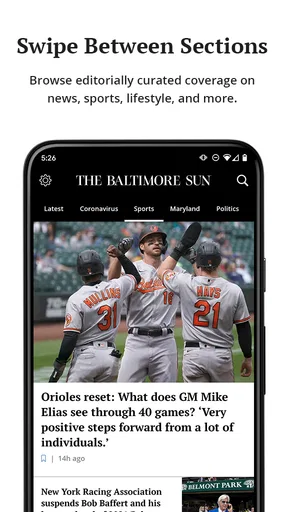
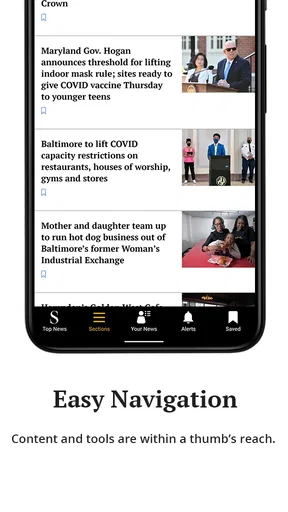
Opening the app for the first time, I was met with a clean and intuitive interface. The design is straightforward, making it easy for anyone to navigate, whether you're tech-savvy or not. The homepage is well-organized, featuring the latest stories at the top, which is perfect for catching up on breaking news quickly. Plus, the search function is quite handy if you're looking for something specific.
One thing I really appreciated was the ability to customize the news feed. You can tailor it to focus on specific categories like politics, sports, or local events. This feature is a game-changer for me because I can prioritize what matters most without wading through tons of articles.
Content Quality
The Baltimore Sun app doesn’t skimp on content. From in-depth investigative pieces to lighter lifestyle articles, there's a good variety here. The reporters seem thorough in their coverage, and the quality of writing is top-notch. As a reader, I felt like I was getting well-rounded insights on the local happenings.
One standout feature is the app’s multimedia integration. Articles often come with accompanying videos and photo galleries, which adds depth to the storytelling. I found this particularly engaging, as it allows me to experience the news in a more interactive way.
A routine that suits local readers
For someone who lives in or regularly visits Baltimore, a useful routine would be to check the app at two natural pauses: once when planning the day and again when there is time to read a longer piece. The morning visit can be a quick scan for local developments; the later one can be reserved for reporting that needs more attention. I find this better than treating every alert as a demand to stop what I’m doing.
It can also help to use the app for context, not just headlines. If a local issue keeps appearing, searching for the subject and reading more than the newest update can make it easier to understand what has changed. That is a practical advantage of a publication with a local focus, though it still makes sense to compare coverage with other reporting when a decision depends on a complete picture.
Notifications and Alerts
Let’s talk notifications, because honestly, who doesn’t have a love-hate relationship with them? The Baltimore Sun app offers timely alerts for breaking news, which is fantastic for staying on top of important events. However, you can easily tailor these notifications to suit your preferences, so you're not overwhelmed by constant pings.
For me, having control over what I get notified about is crucial. I set it up to alert me only for major developments and updates in areas I’m particularly interested in, like local politics and community events.
When it does not behave as expected
If a page stalls or a video fails to play, I would not immediately assume the article itself is the problem. I’d first retry the page, check whether other apps can load content, and move between a Wi-Fi connection and mobile data if available. A temporary connection issue can look much like an app fault, especially when text loads but media does not.
If the issue affects several stories, a sensible recovery sequence is to close and reopen the app, check for an available update, and restart the device if needed. If only one article fails, I’d use search to see whether it can be found again from another route before repeating the same tap. For a purchase or access problem, I’d review the in-app account and transaction details and use the app’s available support route rather than attempting the purchase repeatedly.
These checks are deliberately simple: they help separate a one-off network hiccup from a broader app problem without risking account or payment changes. I would avoid deleting the app as a first response, particularly if I’m unsure how my access or saved preferences are handled. A reinstall is a later troubleshooting step, not a substitute for checking the connection, software version, and account status first.
Choosing it over a general news feed
Compared with a general news aggregator, a newspaper app gives a reader a clearer editorial home and a more concentrated view of one region. That is useful when the question is “What is happening around Baltimore?” rather than “What are the biggest stories everywhere?” The trade-off is breadth: readers who want many publishers in one place, or who follow several cities equally, may find an aggregator more convenient for scanning.
Compared with a newspaper’s website, the app is better suited to a quick, repeatable phone routine, especially if its home page and alerts match the way I read. The website may be preferable when I’m already browsing on a computer or want to move among several sources in open tabs. Neither format automatically makes a story more complete; for sensitive or consequential topics, I’d still seek additional perspectives rather than relying on a single publication.
The app has been released since Jan 18, 2011, and has 50K+ installs. Its average rating is 2.7 from 404 ratings, with 156 written reviews. I take that score as a reason to keep expectations measured, not as a verdict on every person’s experience. It is a useful signal to test the app against my own device, reading habits, and willingness to pay for selected coverage.
Smooth Performance
Now, onto how the app performs. I was pleasantly surprised by how smooth and responsive it is. Pages load quickly, and I didn’t encounter any annoying crashes or bugs. Whether I’m scrolling through articles or watching embedded videos, the experience is seamless. Kudos to the developers for creating an app that runs this well!
Subscription Model
While the app itself is free to download, accessing some premium content requires a subscription. This might be a bit of a bummer for those who prefer everything free, but I found the subscription pricing to be quite reasonable given the quality of content provided. Plus, there are often deals and discounts available, which is a nice bonus.
Who is likely to get the most from it?
I’d recommend it first to Baltimore-area readers who want local reporting close at hand and are willing to make the app part of a regular news habit. It may also suit former residents or people with family, work, or community ties in the region who want to keep up from elsewhere. A commuter could use a short wait to check local headlines, then save the longer reading for a quieter break instead of trying to finish an in-depth story between stops.
I’d be less likely to recommend it to someone who wants an entirely free, all-purpose news feed, follows no particular interest in Baltimore, or prefers to avoid publisher-specific subscriptions. In those cases, a broad aggregator or a selection of free news sources may be a better match. The key question is not whether a dedicated local app is inherently better, but whether local coverage is valuable enough to justify giving it space on your phone and, potentially, paying for access.
Final Thoughts
Overall, the Baltimore Sun app has become a staple on my phone. It’s a reliable source for local news and offers a seamless user experience. Whether you're a Baltimore resident or just someone interested in the area, this app is a fantastic tool to stay informed.
So, if you're like me and crave a little more insight into the world around you, give the Baltimore Sun app a try. With its blend of quality content and user-friendly design, it's definitely worth a download. Happy reading!
My practical advice is to begin with a modest routine: explore the sections that matter to you, use search when a story disappears from the front page, and keep alerts limited to updates that are genuinely time-sensitive. Before paying, make sure the access option shown in the app matches your reading frequency and budget. That small check can prevent the most common disappointment: downloading a local news app expecting every story to be included at no cost.
For me, the strongest reason to keep it is its local focus, while the clearest reason to skip it is a mismatch between that focus and what I actually read. If Baltimore news is part of your everyday life, it is worth trying as a dedicated source. If you mainly want a wide, free survey of national and international headlines, I’d choose a broader alternative and use this only when I need the local perspective.
Verdict
Strengths of Baltimore Sun
- Local news coverage is comprehensive.
- User-friendly and intuitive interface.
- Customizable notification settings.
- Regular updates with new content.
- Access to exclusive articles and features.
Limitations of Baltimore Sun
- Frequent ads can be intrusive.
- Subscription required for full access.
- Occasional app crashes reported.
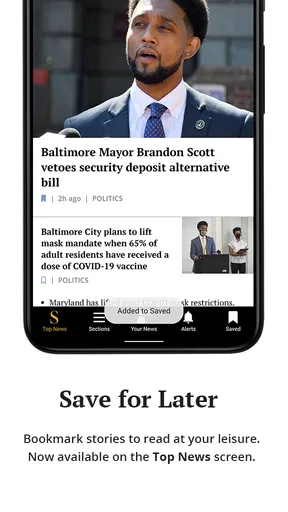
- Limited offline reading options.
- Some sections load slowly.
Other Releases by Tribune Publishing Inc.
View All
New York Daily News
News & Magazines3.3

Chicago Tribune
News & Magazines2.6

Hartford Courant
News & Magazines2.6

Sun Sentinel
News & Magazines2.8
Similar Picks in This Category
View All
Google News - Daily Headlines
Google LLC4.0

X
X Corp.4.8

Flipboard:Your Social Magazine
Flipboard3.4

Opera News: breaking & local
Opera4.5

Hindi News by Dainik Bhaskar
Dainik Bhaskar Group4.0

Way2News Daily News App
Way2News ( Formerly Way2SMS )4.6
Frequently Asked Questions
What features does the Baltimore Sun app offer?
The Baltimore Sun app provides users with comprehensive access to the latest news, sports updates, weather forecasts, and entertainment articles. Users can also enjoy video content, photo galleries, and personalized news alerts. The app is designed for easy navigation, ensuring that readers can quickly find the information they're interested in.
Is the Baltimore Sun app free to use?
The app itself is free to download, but it may require a subscription for full access to premium content. While some articles and features are available for free, subscribing unlocks all content, including in-depth news articles, exclusive stories, and ad-free browsing. Subscription details are available within the app.
Can I customize my news feed within the app?
Yes, the Baltimore Sun app allows users to customize their news feed. By selecting preferred topics and categories, users can tailor their reading experience to focus on the content that matters most to them. This feature ensures that you receive updates on the topics you're most interested in, directly in your feed.
How often is the content updated on the Baltimore Sun app?
Content on the Baltimore Sun app is updated frequently throughout the day to provide users with the most current news and information. Breaking news alerts are sent out as stories develop, ensuring that users are always informed of the latest events and updates as they happen.
Is the Baltimore Sun app available on both Android and iOS?
Yes, the Baltimore Sun app is available for both Android and iOS devices. Users can download the app from the Google Play Store for Android devices or the Apple App Store for iOS devices, making it accessible to a wide range of smartphone and tablet users.
